

How a Learning App Differs From Exam Prep
Why a training companion is not the same product as an exam-practice app, and how to scope accounts, progress sync, labs and App Store status.
The short answer
A learning app carries the course (lessons, video, quizzes and labs) with progress shared with the web classroom. An exam-practice app rehearses test day against live outlines. Brief them as separate products that can connect in the student path, not as one overloaded MVP.
Key takeaways
- Separate the companion classroom job from the practice-bank job before you write screen lists.
- Require the same accounts, catalog and progress on phone and web.
- Keep enrollment on the systems you already trust instead of inventing phone-only commerce.
- Use one accurate App Store sentence, such as Apple-approved, launching soon, until the listing should be opened.
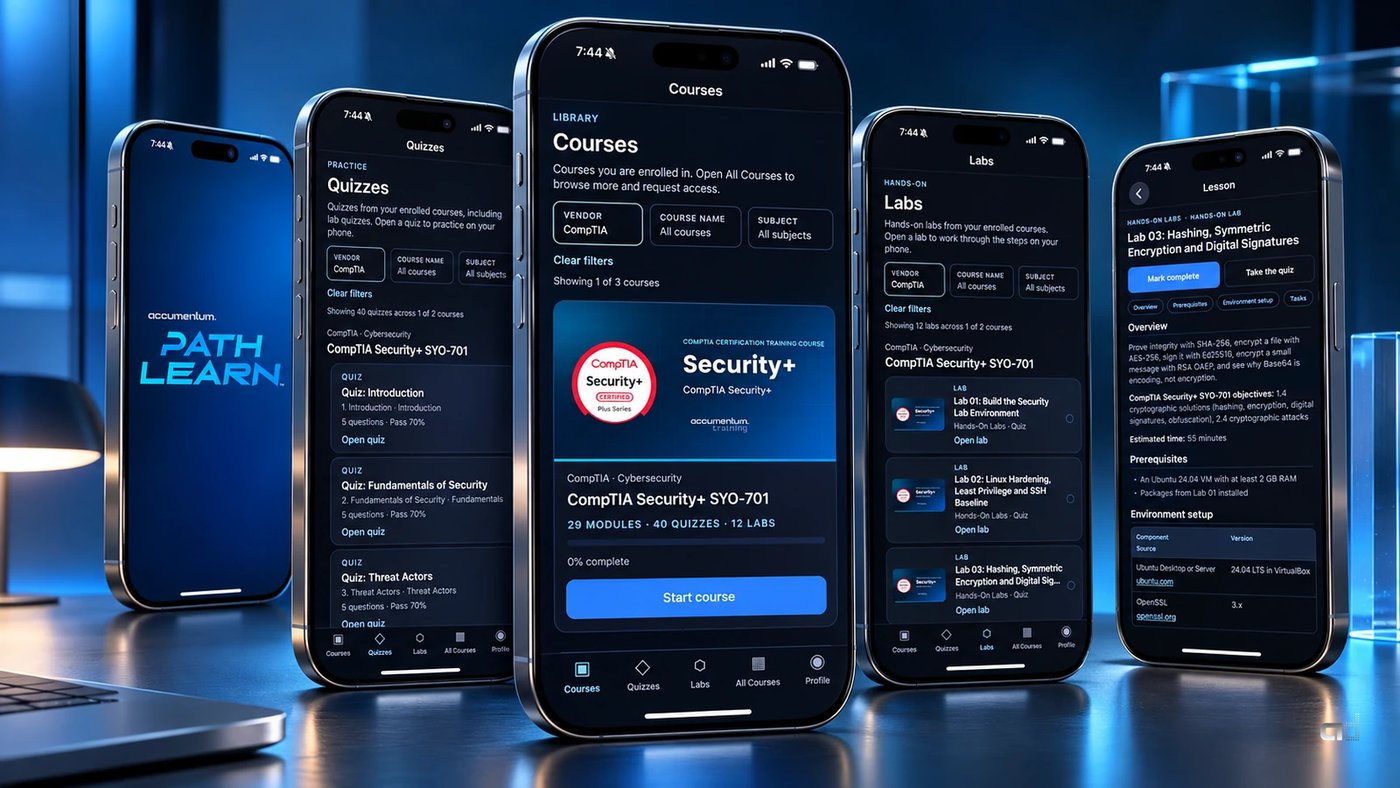
Teams building for certification students often ask for "an app" as if practice banks and training classrooms were the same product. They are not. An exam-practice app helps someone rehearse test day. A learning app carries the course: lessons, video, quizzes and labs, with progress that still makes sense when the same person opens the web classroom later.
Accumentum Digital designs both kinds of product inside our engineering and platforms work. Knowing which one you need (or how they should work together) saves months of rebuild. For a learning-companion example, see Accumentum® PathLearn™: a custom iPhone companion to Accumentum® training with courses, video lessons, quizzes and labs, synced to training.accumentum.net. Apple-approved, launching soon.
Two jobs, two products
Exam prep answers: "Can I perform on this outline under time?" Learning answers: "Can I work through the course I enrolled in, including the labs, on the device I have right now?"
PathPass® is Accumentum's standalone practice product: banks, timed sessions, readiness. PathLearn™ is the mobile companion to the live training experience. It is not a separate classroom. Account, catalog and progress are shared with training.accumentum.net, so a session started on the phone continues on the web without a second setup.
If your brief mixes "question banks" and "video lessons and labs" into one MVP without saying which job owns the home screen, expect scope fights in week two.
What a learning companion has to sync
A training companion earns trust when the phone and the web agree. That usually means:
- The same login and enrollment rules.
- The same course catalog and entitlements.
- Progress on lessons, quizzes and labs that updates in both places.
- Media that plays cleanly on a phone without breaking the desktop classroom.
PathLearn™ is built around that contract. Learners browse the catalog, continue enrolled courses from a Courses home, watch lessons, run quizzes and open lab detail with steps ready to work through. The classroom behind the app is the same one that already runs on the web for enrolled learners.
Scoping an MVP learning app
Release one for a companion app should be boring in the best way. Aim for:
- Sign-in against the real training accounts you already operate.
- Courses home for enrolled work, plus a catalog path that respects entitlements.
- Video lessons that behave on cellular and on Wi-Fi.
- Quizzes with results the learner can trust.
- Labs presented as work to do, not as a PDF dump.
- Profile and progress that match the web.
Skip building a second merchandising store on the phone if enrollment already happens on the web. PathLearn™ is free to install. A PathLearn account is required, and new accounts are approved by an administrator, so course access follows real enrollment rather than an in-app impulse buy.
Native craft still matters on a companion
Even when the source of truth is a web classroom, the phone client is where study fits into a workday. PathLearn™ is a custom native iOS client with Accumentum midnight craft, Dynamic Island aware layout and a PathLearn™ splash. That is not decoration. Splash, navigation and lesson chrome are what make the companion feel like the same brand as the desktop classroom instead of a wrapped website.
Cross-platform can be right when Android must ship in the same release. For Accumentum the first public PathLearn™ client is iPhone, aligned with how our learners already study. Platform order should follow audience evidence, not a default of "both stores on day one."
App Store wording while you wait to launch
Education companions often sit in a gap between "binary approved" and "public download." PathLearn™ uses a single public line: Apple-approved, launching soon. There is no App Store badge and no store URL on the case study until the listing is meant to be opened.
If you are mid-review or approved but not live, write the public sentence now and use it everywhere: site, case study, social, sales decks. Inventing a download button early creates support load and review risk. Keeping the sentence accurate is part of professional delivery.
How learning apps differ in content design
Practice banks optimize for outline coverage and timing. Learning apps optimize for sequence: module order, lesson length that fits a commute, quizzes that check the lesson just watched, labs that ask the learner to do the work the credential expects. PathLearn™ is designed around certifications such as ISACA CISM and AAISM, ISC2 CISSP, CompTIA SecurityX and CySA+, and Cisco CCNA, so study can happen in the gaps of a real workday.
When you brief a vendor, bring one full course path (lessons, quiz, lab) and ask them to show how it will feel on a phone. If the answer is "we will embed the desktop player," you do not have a companion app yet.
Questions worth asking any build partner
Before you sign a statement of work for a learning companion, ask for plain answers to:
- Which system is the source of truth for enrollments and progress?
- What happens when a learner finishes a quiz on the phone, then opens the same course on a laptop?
- How will video and labs behave on a mid-range phone on cellular?
- What will the public App Store sentence say at each stage: in review, approved, live?
- Who owns the binary, the API and the content after launch?
PathLearn™ was scoped so those answers stay short: training.accumentum.net remains the classroom of record, the iPhone client is a companion, and the public status stays "Apple-approved, launching soon" until the listing is meant to be used.
How Accumentum Digital approaches the work
We separate practice products from training companions, then connect them where the student path needs both. PathLearn™ carries the Accumentum® classroom into iPhone with shared accounts and progress. PathPass® stays focused on exam formats and readiness. Buyers get clearer scope, cleaner store listings and a product that matches how certification study actually happens.
If you are planning a custom learning app, decide the companion contract first: same accounts, same catalog, same progress, honest App Store status. The screen list gets easy after that.
Frequently asked questions
Can one app do learning and exam practice well?
Sometimes as a suite, rarely as a single muddled home screen. Accumentum keeps PathLearn™ as the training companion and PathPass® as the practice product, then connects them where the student path needs both.
What must sync between phone and web?
Login, enrollments, catalog entitlements and progress on lessons, quizzes and labs. If those disagree, learners stop trusting both surfaces.
What is the right public status before launch?
Whatever is true. PathLearn™ uses Apple-approved, launching soon, with no App Store badge or URL on the case study until the listing is meant to be used.
Does a learning companion need in-app course sales?
Not if enrollment already happens on the web. PathLearn™ is free to install. A PathLearn account is required and new accounts are approved by an administrator so access follows real enrollment.


