

When a Membership Community Needs a Custom App
How to decide when a membership brand needs a custom community app instead of a white-label tool, and how to scope web, iPhone and checkout honestly.
The short answer
A membership brand needs a custom app when a white-label community tool cannot carry its voice, membership rules or content workflow without constant workarounds. Scope the member jobs first, ship a real web community, add a native iPhone client that shares the same API, keep checkout rules explicit, and state App Store status accurately until the listing URL is live.
Key takeaways
- Write the member jobs for release one before you inherit a vendor feature list.
- Treat web and iPhone as one product that shares accounts and content, not as two separate apps.
- Decide checkout rules early, including whether purchases stay on the web.
- Keep public store language honest: Coming soon until the App Store URL is real.
A lot of membership brands start on a white-label community tool. It ships fast. Feed, rooms, events and member profiles show up out of the box. Then the brand grows, the founder wants the product to feel like their voice, and the template starts to get in the way.
That is the fork most teams hit. Keep bending a shared product to fit, or commission a custom membership app that matches how your members actually show up. Accumentum Digital builds that second path as part of our engineering and platforms work. The questions below are the ones we walk through before anyone writes a line of product code.
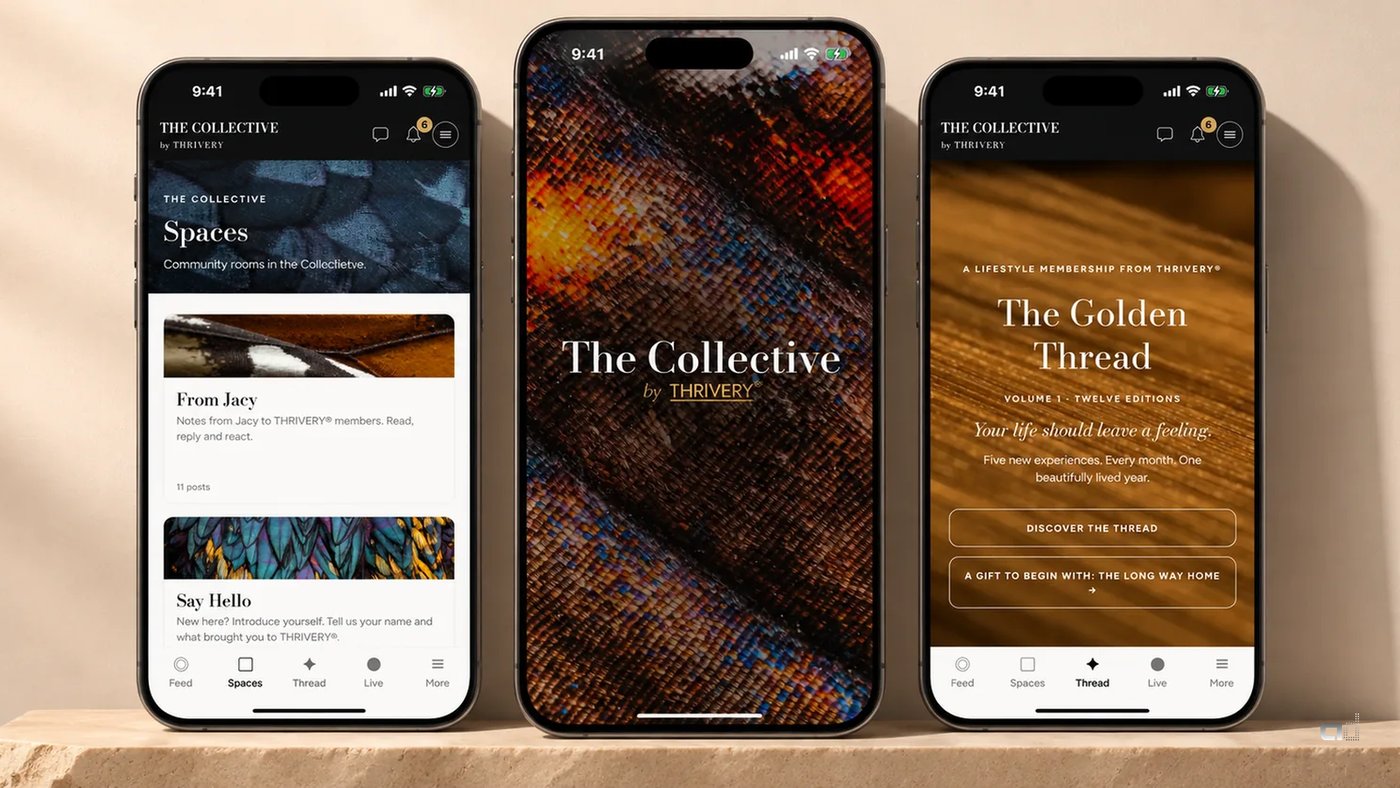
For a live example of a custom membership product, see The Collective by THRIVERY®: a free private community on the web and a custom native iPhone app, coming soon to the App Store.
Start with the membership job, not the feature list
A membership app exists so people can do a few jobs well: share what they are living, gather with the founder, go deeper when they want more, and keep a quiet everyday rhythm with the group. If you start from a vendor's feature matrix, you inherit their vocabulary. Start from the jobs instead.
Write the five or six things members must be able to do in the first release. For The Collective that meant newest-first posts and gentle rooms, Live sessions with Jacy Ángelle Smith plus replays, The Golden Thread for members who want to go deeper, a Start Here welcome note, member directory and profiles, private conversations, search, saved posts and push on iPhone. Everything else waited.
If a candidate feature does not serve one of those jobs, it is not in the MVP. That is how you keep a custom build from becoming a multi-year science project.
Decide what "custom" actually means
Custom is not a synonym for "we rebuilt chat from scratch." It means the product is shaped around your brand, your membership rules and your content, not around a generic community template. In practice that usually covers three layers:
- A member-facing web app that already carries the full experience, so people can join and participate before a store listing exists.
- A native iPhone client that shares the same secure API, so the pocket experience matches the web rather than becoming a thinner clone.
- Admin and content tools your team owns, so moderation, Live scheduling, membership state and campaigns stay in house.
The Collective follows that pattern. The full member community runs at collective.thrivery.life. The iPhone app is a native client with THRIVERY® craft, push notifications and deep links into Collective pages. Superadmin work stays on the web. That split keeps the App Store binary focused on the member experience.
Web first, then native, with honest store status
For a membership product, shipping the web community first is often the right call. Members can join, post and attend Live while the native client is still in review. Your marketing site can say exactly where things stand. For The Collective the public line is "Coming soon to the App Store." There is no invented download link and no Android claim until an Android product exists.
Buyers evaluating a custom app proposal should ask for the same honesty: which platforms are live, which are approved, which are still in build, and what the public CTA will say until the store URL is real.
Plan checkout without turning the app into a storefront
Membership products often mix a free community with a paid deeper tier. How that purchase happens on iOS is a product decision, not an afterthought. Apple's guidelines have a path for reader-style and web-completed purchases in specific cases. The Collective keeps Golden Thread checkout on the web. The iPhone app does not sell through in-app purchase. Members who need checkout continue on the site.
Whatever path you choose, document it early with your engineer and your reviewer notes. Do not leave "we will figure out payments later" in the backlog of a custom membership app.
Native versus cross-platform for a community client
Cross-platform frameworks can be a fit when one team must ship iOS and Android from a shared codebase and the UI is mostly forms and lists. A membership brand that cares about splash craft, typography, push behavior and deep links into a branded web surface often still chooses a native iOS client first, especially when Android is not in the first release.
The Collective's public scope is iOS native plus the web app. Android is not claimed. That is a scoping choice, not a failure. Matching platform claims to what you will actually maintain is part of the value of a careful build partner.
What an MVP membership app needs
If you are writing a brief for a custom membership app, these are the pieces that usually belong in release one:
- Accounts, profiles and a clear set of community agreements members can find again.
- A feed and rooms that match how your people actually talk, not a generic forum skin.
- Live or event surfaces with a replay path, if gathering is part of the membership promise.
- A paid deeper tier only if the business model needs it, with checkout rules decided up front.
- Push notifications and deep links so the phone is useful between sessions.
- Admin tools for moderation, content and membership state that your team can run without opening a support ticket to a vendor.
Notice what is missing: leaderboards, public discovery feeds, every social network's feature set. Custom work earns its cost when it protects the membership feel. It wastes money when it recreates a network nobody asked for.
Questions worth asking before you choose custom
Custom membership work is a poor fit when a configured community tool already matches how your members talk. It is a strong fit when brand, membership rules and content tools are part of the product. Ask:
- Which member jobs must feel on-brand in release one?
- Will checkout stay on the web, and how will that be explained in App Review notes?
- What does the public store CTA say until the listing URL is real?
- Who moderates, schedules Live and manages membership state day to day?
- Is Android in scope for the first year, or is iPhone plus web the honest first release?
The Collective case study is useful here because the answers are visible in the shipped product: free community plus Golden Thread, web checkout, Coming soon to the App Store, and no Android claim.
How Accumentum Digital approaches the work
We scope from the membership jobs, design the web and native surfaces as one system, and keep public store language accurate while review is in progress. The Collective case study shows that stack in the wild: free community, Golden Thread for members who want more, native iPhone craft, web checkout, and a calm product that feels like THRIVERY® rather than a rented template.
If you are weighing a white-label community against a custom app, start with the jobs, the platforms you will truly support, and the checkout rules. The feature list comes after those decisions, not before.
Frequently asked questions
When is a white-label community tool enough?
When your members already talk the way the template expects, your brand can live inside its chrome, and you do not need custom membership tiers, Live workflows or admin tools. The moment those start fighting the template, custom work becomes the clearer path.
Should the iPhone app launch before the web community?
Usually no. A live web community lets members join and participate while the native client is still in review. The Collective ships that way: full web community at collective.thrivery.life, iPhone app coming soon to the App Store.
Does a custom membership app require in-app purchase?
Not always. Some membership products keep paid checkout on the web and keep the App Store binary focused on the member experience. Document the path you choose before review, and do not leave payments as a late surprise.
What belongs in an MVP membership app?
Accounts and agreements, a feed and rooms that match how your people talk, Live or events with replays if gathering is part of the promise, optional paid deeper tier with checkout rules decided, push and deep links, and admin tools your team can run.


