

Designing a Training Portal That Works on Web and iPhone
How to design a training portal that keeps modules, labs and quizzes in one login, with enrollment-based access and synced progress on the web and iPhone.
The short answer
A training portal should keep modules, labs and quizzes in one login, grant access only after enrollment is approved, and sync progress between the web classroom and the iPhone app so both surfaces tell the same story.
Key takeaways
- Keep modules, labs and quizzes in one account and one catalog.
- Let access follow enrollment and administrator approval, not the act of installing an app.
- Sync lesson, quiz and lab progress between phone and web, including a clear way to continue learning.
- Write the public site so it does not promise classroom access before registration is complete.
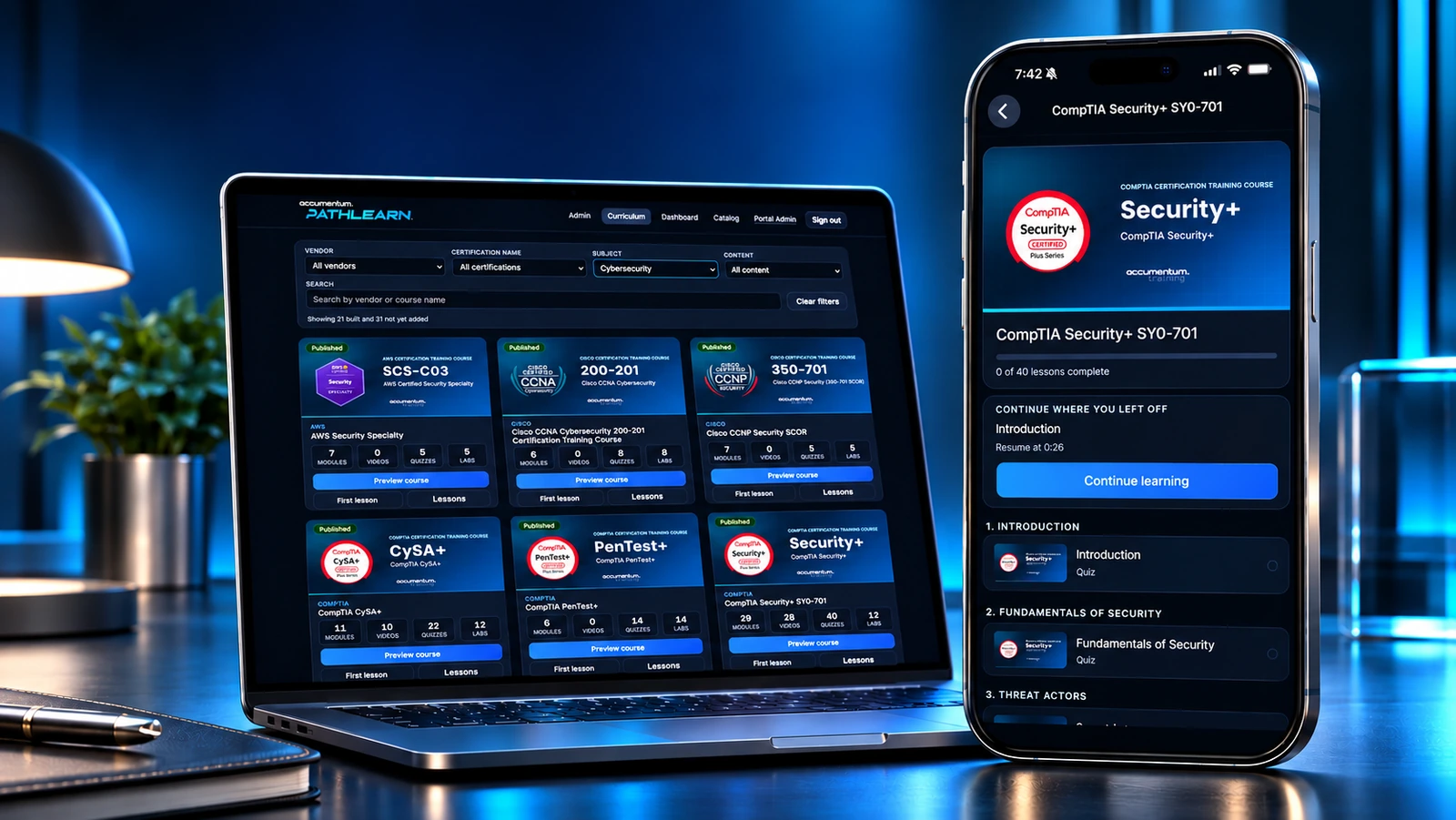
A certification student does not live on one device. A module might start at a desk, a lab might be reviewed at lunch and a quiz might happen later on a phone. If those activities sit in different logins, or if progress on one surface never appears on the other, the portal stops feeling like a classroom and starts feeling like a pile of tools.
That is the job we gave Accumentum® PathLearn™. PathLearn is Accumentum's certification training portal: expert-led modules, hands-on labs and practice quizzes in one login. Approved students open it on the web at training.accumentum.net or on iPhone from the App Store, with progress that syncs across both. The public product site is pathlearn.net. This article is about that portal as a whole. It is not a repeat of our earlier piece on how a learning app differs from an exam-practice product.
One login for modules, labs and quizzes
PathLearn is designed so those three activities share an account, a catalog and a progress record. Students filter the catalog by vendor, subject or course, continue enrolled work from Courses home, watch expert-led modules that resume where they left off, open lab detail with steps ready to run, and take practice quizzes that show a clear result. The web portal and the iPhone app present the same classroom, not a reduced mobile copy on one side and a different site on the other.
The public site describes the current catalog as 200+ training courses, 700+ practice quizzes and 450+ hands-on labs for approved Accumentum students. Those figures belong to PathLearn's own public wording as of this writing. The design lesson does not depend on a more precise count. It depends on keeping the catalog, the activities and the progress record inside one product so a student can stack credentials without leaving the portal.
Access should follow enrollment
Downloading an app, or visiting a marketing site, is not the same thing as being enrolled. PathLearn is built for approved Accumentum students. Registration happens first through Accumentum. When enrollment is ready, the student signs in on the web or in the app with an approved account. The app is free to install, and downloading it alone does not create access. That rule keeps the phone client from becoming a second storefront and keeps course entitlements tied to the same registration the school already runs.
It also makes the public site easier to write honestly. pathlearn.net can explain what the portal contains, who it is for and where to sign in, without pretending that anyone who finds the App Store listing is already a student. The registration path stays on Accumentum's training site. The portal stays available on both surfaces once approval is in place.
Progress has to be the same story everywhere
The trust test is simple. If a learner finishes a lesson on iPhone and later opens the same course in a browser, the portal should already know. PathLearn keeps lesson and module progress in the shared account, and Courses home uses continue-learning cards so the next step is visible on either surface. Video lessons can be paused and resumed, which matters when training has to fit a working schedule rather than a full morning at a laptop.
If that contract is weak, people stop trusting both surfaces and start keeping their own notes. The engineering work is not a visual refresh of the same screens. It is shared identity, shared entitlements and shared progress, presented carefully on a phone and on a desktop or tablet. The PathLearn case study keeps the existing iPhone gallery and adds the portal context, including an iPad course-progress view from the official training experience.
What to settle before you add a second surface
If you are planning a training portal that will live on the web and on a phone, write the classroom contract first. Which system is the source of truth for enrollment? What exactly syncs: login, catalog entitlements, lesson progress, quiz results, lab status? What can a guest see, and what opens only after an administrator approves the account? What will the public site say about access, so marketing does not get ahead of registration?
Then decide what must be in the first version on both surfaces: a catalog the student can filter, a way to continue enrolled work, modules that resume, labs that are actually work to do, and quizzes with results a person can trust. PathLearn ships those pieces on the web and on iPhone today. PathPass® remains Accumentum's separate exam-practice product, which is a different job and a different brief.
Accumentum Digital builds this kind of product when the classroom already exists and the student still needs it in their pocket, or when both surfaces are being designed together. For the shipped example, see the PathLearn case study and the live product site. If you also need to separate a training portal from an exam-practice app, start with How a Learning App Differs From Exam Prep, then come back to the portal contract described here.
Frequently asked questions
Should the phone app be a different classroom from the web portal?
No. PathLearn uses the same login, catalog and progress on training.accumentum.net and in the iPhone app.
Does downloading the app create a student account?
No. PathLearn is for approved Accumentum students. Access follows registration and approval.
What has to sync for the portal to be trusted?
Login, entitlements and progress on lessons, quizzes and labs. If those disagree, learners stop trusting both surfaces.
How is this different from an exam-practice app?
PathLearn is the training portal for modules, labs and quizzes. PathPass is Accumentum's separate practice product. We cover that distinction in a separate article.


